
Understanding your plan
Compare Ordinary's Free, Starter, Advanced and Enterprise plans — what each includes, feature and seat limits, and how pricing scales with store revenue.
 Written by The Ordinary Team · Updated
 On this page
Ordinary has four plans. Every plan shares the same first-party pixel and core Shopify integration — they differ in attribution depth, ad-spend integrations, team size, and support. Free already shows you which channels drive your revenue (from the pixel and your order data) and your repeat purchase rate; paid plans add the ad-spend side (ROAS), multi-touch models, customer journey mapping, and the deeper analytics surfaces.
At a glance
| Feature | Free | Starter | Advanced | Enterprise |
|---|---|---|---|---|
| First-party Shopify pixel | ✓ | ✓ | ✓ | ✓ |
| Revenue attributed by channel | ✓ | ✓ | ✓ | ✓ |
| First-click + last-click attribution | ✓ | ✓ | ✓ | ✓ |
| Repeat purchase & retention rates | ✓ | ✓ | ✓ | ✓ |
| Customer journey mapping | — | ✓ | ✓ | ✓ |
| Revenue reconciliation (match-to-cent) | ✓ | ✓ | ✓ | ✓ |
| A/B testing (experiments) | 1 test¹ | Unlimited | Unlimited | Unlimited |
| Ad spend & ROAS (Meta, Google, Amazon, GA4, Klaviyo) | — | ✓ | ✓ | ✓ |
| Multi-touch attribution (linear, time-decay) | — | ✓ | ✓ | ✓ |
| Custom channel taxonomy | — | ✓ | ✓ | ✓ |
| Subscription-aware attribution | — | ✓ | ✓ | ✓ |
| Report history | 30 days | Unlimited | Unlimited | Unlimited |
| AI-powered session replays | — | — | ✓ | ✓ |
| Cohort retention & LTV | — | — | ✓ | ✓ |
| Creative analytics studio | — | — | ✓ | ✓ |
| Product financials & margins | — | — | ✓ | ✓ |
| Offer Calculator | — | — | ✓ | ✓ |
| Inventory & logistics | — | — | ✓ | ✓ |
| Team seats | 1 | 5 | Unlimited | Unlimited |
| Support | In-app chat | In-app chat | In-app chat | Dedicated contact |
| Dedicated onboarding | — | — | ✓ | ✓ |
| SSO, audit logs, SOC 2 | — | — | — | ✓ |
¹ Free includes one A/B test, the first one you create. It’s there so you can run a real test on your own store and see what the feature does before paying for it — ending, archiving or deleting that test doesn’t free up another, and on Free only that test can be started or resumed. Moving to Free from a bigger plan keeps that test running and ends the others that are running or paused. Starter and Advanced remove the limit.
Channel attribution vs. ROAS: Free shows revenue by channel — which sources and campaigns are driving sales — because that’s derived from the first-party pixel and your order data. Spend and ROAS require connecting your ad accounts (Meta, Google, Amazon, GA4, Klaviyo), which is a Starter+ feature, so the cost/return columns appear once you upgrade and connect.
Pricing
Paid plans are billed monthly and scale with your store’s revenue — there’s no annual plan and no annual discount. Free is $0/mo at all revenue levels.
Starter starts at $99/mo and Advanced at $149/mo for stores under $250K in revenue. The monthly price steps up at each higher revenue tier, and your plan scales automatically as your store grows. See Understanding your GMV tier for the full tier ladder.
Enterprise is custom-priced and invoiced directly. Email sales@tryordinary.com if you’re at $20M+ in revenue or need SSO / audit / SOC 2.
Where to see your current plan
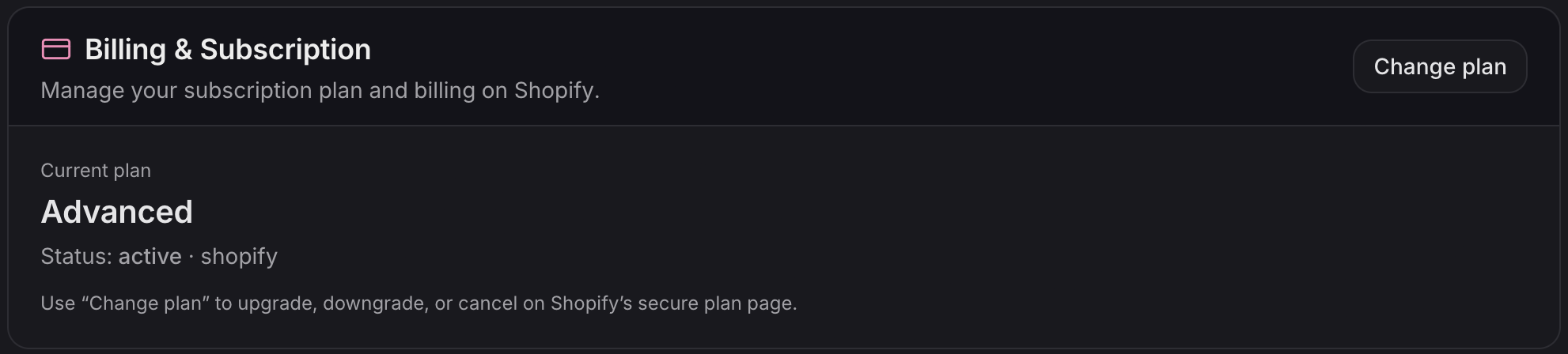
Settings → Billing & Plan. The Billing & Subscription card shows:
- Current plan — the plan your store is on
- Status — whether the subscription is active
- Change plan — opens Shopify’s plan page
If you’ve cancelled, the card also shows the date your access ends. Charges and billing dates are handled by Shopify, so you’ll find them on Shopify’s plan page and in your Shopify bills.
Trying Advanced for free
Stores on the Free plan can try Advanced free for 30 days, once. It never creates a charge, and the store moves back to Free automatically when it ends. See The free Advanced trial.
Switching plans
Click Change plan on the Billing & Subscription card. It opens Shopify’s secure plan page, where you upgrade, downgrade or cancel. See Upgrading your plan.
Self-serve pricing explorer
Visit tryordinary.com/pricing to see how Starter and Advanced pricing changes across revenue tiers. The slider lets you preview your monthly cost at any revenue level, so there’s no surprise when you grow into a higher tier.